How to build an AI director
Earlier this year I wanted to learn how agents work so I built an AI director.
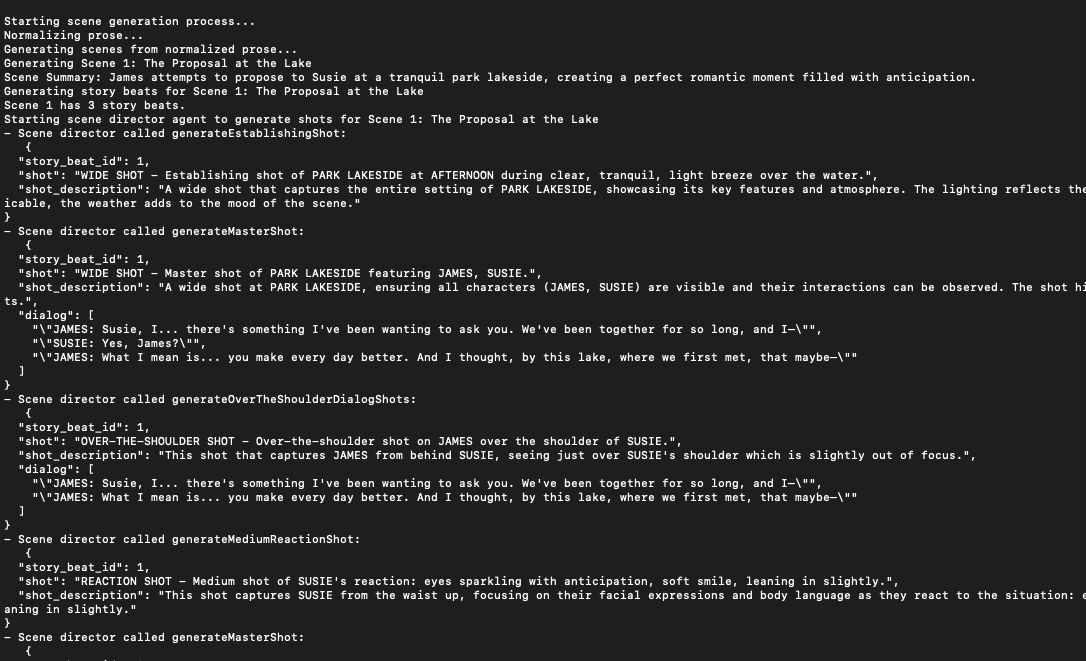
The best way to learn is to build, so a few months ago I built a scene generator app to understand hands on how AI agents work in apps. 2025 has been the year of agents. Built on the back of LLMs, agents have allowed developers to integrate LLMs into apps in more useful ways.
For the scene generator, the goal was simple. Given any prose (narrative description), the scene generator builds a structured output detailing a shot-by-shot breakdown of the prose. With LLMs, generating text pretty much encompasses what the technology does, but generating structured outputs like JSON or XML is incredibly powerful because that allows LLM outputs to be used programmatically.
I was also curious what it would be like to build an “AI Director” that can take any narrative and translate it visually. The idea here wasn’t to figure out how to have AI direct scenes for a real film. More so what I think could be interesting is having an AI app that could simulate different directorial styles. So given any story, you can pose the question: what if Spielberg directed it, or Scorsese, or Park Chan Wook - and get a scene outline that would guesstimate how the masters would approach it.
I didn’t explore having the scene generator simulate directorial styles in this learning project but it’s one of those interesting ways to think about how AI could be applied to support creative understanding.
For the scene generator, the AI workflow was broken down into several steps (see sample output at end of article).
- Normalize the prose - For this part, an LLM takes any prose input and fleshes it out/streamlines it such that the plot, theme, tone, and character motivations are clear. I think of this step as being like a director taking a script or treatment and making it his or her own.
- Split the prose and generate scene descriptions - This step splits the prose into logical scenes, looking at the settings and significant narrative shifts present. As the prose is split, scene descriptions for each part are generated in a structured format such that the makeup of each scene is clear.
- Generate story beats - This step looks at each scene description and creates a beat breakdown such that the scene has a clear narrative arc.
- Scene Director agent - Once the scenes and narrative beats are defined, they are sent to a Scene Director agent which takes all the information generated from the prior steps and figures out how to construct the scenes visually using shot descriptions.
Steps 1 - 3 of this workflow are standard LLM fare. Save for the structured outputs to JavaScript objects enforced through Zod schemas, each one of those steps can be done using any LLM chat app like ChatGPT. But the scene director step is a bit more special because it is agentic.
export const sceneDirectorAgent = async (scene: Scene) => {
    const shots: ShotOutput[] = [];
    const result = streamText({
        model: openai(MODEL_DEFAULTS.scene_director_model),
        system: SCENE_DIRECTOR_SYSTEM_PROMPT,
        prompt: `
            scene: ${JSON.stringify(scene, null, 2)}
        `,
        tools: {
            generateDialogSingleShot,
            generateEstablishingShot,
            generateMasterShot,
            generateInsertShot,
            generatePOVShot,
            generateMediumReactionShot,
            generateIntenseReactionShot,
            generateActionShot,
            generateCutawayShot,
            generateOverTheShoulderDialogShots,
            markSceneComplete
        },
        toolChoice: 'required',
        stopWhen: ({steps}) => {
            return steps.some(step => {
                return step.toolResults.some(toolCall => toolCall.toolName === 'markSceneComplete');
            })
        },
        maxRetries: 1

    });

    // Stream tool results as they happen
    for await (const part of result.fullStream) {

        if (part.type === 'tool-result') {
            console.log(`- Scene director called ${part.toolName}:`);
            console.log(`   ${JSON.stringify(part.output, null, 2)}`);

            if (part.toolName !== 'markSceneComplete') {
                shots.push(part.output as ShotOutput);
            }
        }
    }

    return shots;
}
Conceptually, agents are nothing complicated when thinking about it in programmatic terms. They are basically while loops. Logically, all a while loop represents is saying “do x until y happens”. When working programmatically with LLMs, agents are just while loops that say “keep generating until you reach a predetermined stop generating condition”.
Where it gets interesting is the flexibility around the stop condition. With LLMs you make the stop conditions more subjective than you can in traditional programs. For instance, the stop condition for the Scene Director agent is a tool call that the LLM executes when it determines that all the shots for a given scene have been generated.
Tool calls are “actions” available for the agent to take. The actions are functions that the LLM can execute to get some return data that can help it to complete the task given from the prompt instructions. For the Scene Director agent, the tools the agent could call were the types of shots it could generate.
Each tool told the scene director agent to provide it with some input data it would need to create the shot description. These were data elements such as the characters in the shot, dialogue spoken by the characters, location of the shot, point of view, etc.
Once provided with this data, the tool would return the shot description. Here are the tools made available to the Scene Director agent. It doesn’t cover the range of possibilities available to cover a scene and there are more complex orchestration patterns that could work better, but it’s a good representation for how to think about how to provide LLMs discreet tools it can use to complete tasks.
- generateEstablishingShot
- generateMasterShot
- generateActionShot
- generateDialogTwoShot
- generateOverTheShoulderDialogShots
- generateDialogSingleShot
- generatePOVShot
- generateInsertShot
- generateCutawayShot
- generateMediumReactionShot
- generateIntenseReactionShot
Putting it all together, narrative is transformed into scenes which are fed into an LLM that loops through possible shots it can use to represent each beat of the scene until it has covered each scene in the narrative.
It’s fairly simple, but what’s powerful is what happens after the scenes are generated. Since the output is in a structured format (JSON), it’s very easy to automate anything else that may need to be done with the scenes. For example, sending the dialogue text to Elevenlabs to make voice dialogue or sending the character and shot descriptions to an image generation model for visualization.
This was a fun way to learn more about agents and how they work. Having scratched the surface with this learning project, I saw how this technology will change a lot of things. Turning the reasoning ability of LLMs into structured data that can be automated won’t only reveal value for boring white-collar jobs. This project showed me a glimpse of what creative possibilities may be coming as well.
Want to run the scene generator yourself? Clone the repo on github.
Sample Input prose:
At a park by the lake, James and Susie talk about getting married. A stranger runs by and pushes susie into the lake. James looks out, flustered. Later that night, Susie and James argue because she beleives he didn't protect her.
Sample Scene:
{
  "scene": {
    "time_of_day": "DUSK",
    "location": "LAKESIDE DOCK",
    "location_pov": "EXTERIOR",
    "primary_characters": [
      "JAMES",
      "SUSIE"
    ],
    "incidental_characters": [],
    "story_beats": [
      {
        "id": 1,
        "action": "James kneels beside the lake, ring box in his pocket, preparing for the perfect proposal moment",
        "purpose": "To establish the romantic setup and James's intention to propose, creating anticipation and emotional investment",
        "characters": [
          "JAMES",
          "SUSIE"
        ],
        "has_dialog": false,
        "shots": [
          {
            "story_beat_id": 1,
            "shot": "WIDE SHOT - Establishing shot of LAKESIDE DOCK at DUSK during Clear, golden sunset sky.",
            "shot_description": "A wide shot that captures the entire setting of LAKESIDE DOCK, showcasing its key features and atmosphere. The lighting reflects the time of day, with warm, fading light. If applicable, the weather adds to the mood of the scene."
          },
          {
            "story_beat_id": 1,
            "shot": "WIDE SHOT - Master shot of LAKESIDE DOCK featuring JAMES, SUSIE.",
            "shot_description": "A wide shot at LAKESIDE DOCK, ensuring all characters (JAMES, SUSIE) are visible and their interactions can be observed. The shot highlights the outdoor environment and its elements."
          },
          {
            "story_beat_id": 1,
            "shot": "ACTION SHOT - Action shot of James kneels at the edge of the dock, the lake shimmering behind him, subtly adjusting the ring box in his pocket as Susie looks out over the water.",
            "shot_description": "This shot captures the dynamic movement of James kneels at the edge of the dock, the lake shimmering behind him, subtly adjusting the ring box in his pocket as Susie looks out over the water, emphasizing the physicality and energy of the scene."
          }
        ]
      },
      {
        "id": 2,
        "action": "James reaches for Susie's hand as the sun paints golden streaks across the water",
        "purpose": "To heighten the romantic atmosphere and show James actively beginning the proposal, building tension",
        "characters": [
          "JAMES",
          "SUSIE"
        ],
        "has_dialog": true,
        "dialog_turns": [
          {
            "character": "JAMES",
            "dialog": "Susie... there's something I need to ask you."
          },
          {
            "character": "SUSIE",
            "dialog": "What is it, James?"
          }
        ],
        "shots": [
          {
            "story_beat_id": 2,
            "shot": "WIDE SHOT - Master shot of LAKESIDE DOCK featuring JAMES, SUSIE.",
            "shot_description": "A wide shot at LAKESIDE DOCK, ensuring all characters (JAMES, SUSIE) are visible and their interactions can be observed. The shot highlights the outdoor environment and its elements.",
            "dialog": [
              "\"JAMES: Susie... there's something I need to ask you.\"",
              "\"SUSIE: What is it, James?\""
            ]
          },
          {
            "story_beat_id": 2,
            "shot": "OVER-THE-SHOULDER SHOT - Over-the-shoulder shot on JAMES over the shoulder of SUSIE.",
            "shot_description": "This shot that captures JAMES from behind SUSIE, seeing just over SUSIE's shoulder which is slightly out of focus.",
            "dialog": [
              "\"JAMES: Susie... there's something I need to ask you.\""
            ]
          },
          {
            "story_beat_id": 2,
            "shot": "OVER-THE-SHOULDER SHOT - Over-the-shoulder shot on SUSIE over the shoulder of JAMES.",
            "shot_description": "This shot that captures SUSIE from behind JAMES, seeing just over JAMES's shoulder which is slightly out of focus.",
            "dialog": [
              "\"SUSIE: What is it, James?\""
            ]
          },
          {
            "story_beat_id": 2,
            "shot": "ACTION SHOT - Action shot of James gently takes Susie’s hand as the sun’s reflection shimmers across the lake’s surface.",
            "shot_description": "This shot captures the dynamic movement of James gently takes Susie’s hand as the sun’s reflection shimmers across the lake’s surface, emphasizing the physicality and energy of the scene."
          }
        ]
      },
      {
        "id": 3,
        "action": "James hesitates, his heart hammering as he starts to reach for the ring box",
        "purpose": "To show James's vulnerability and nervousness, making the moment feel real and intimate before the interruption",
        "characters": [
          "JAMES",
          "SUSIE"
        ],
        "has_dialog": false,
        "shots": [
          {
            "story_beat_id": 3,
            "shot": "REACTION SHOT - Medium shot of JAMES's reaction: James swallows hard, glancing down as his hand hovers nervously near his pocket, chest rising with shallow breaths.",
            "shot_description": "This shot captures JAMES from the waist up, focusing on their facial expressions and body language as they react to the situation: James swallows hard, glancing down as his hand hovers nervously near his pocket, chest rising with shallow breaths."
          },
          {
            "story_beat_id": 3,
            "shot": "CLOSE-UP SHOT - Insert shot on Close insert on James’s fingers brushing the outline of the ring box through his pocket fabric.",
            "shot_description": "A close-up shot focusing on Close insert on James’s fingers brushing the outline of the ring box through his pocket fabric. This shot draws attention to Close insert on James’s fingers brushing the outline of the ring box through his pocket fabric, letting the viewer know that it is an important detail within the scene."
          },
          {
            "story_beat_id": 3,
            "shot": "REACTION SHOT - Medium shot of SUSIE's reaction: Susie studies James with a soft, curious smile, sensing his nerves but not yet understanding.",
            "shot_description": "This shot captures SUSIE from the waist up, focusing on their facial expressions and body language as they react to the situation: Susie studies James with a soft, curious smile, sensing his nerves but not yet understanding."
          }
        ]
      },
      {
        "id": 4,
        "action": "A blur of motion appears on the jogging path in the background, approaching fast",
        "purpose": "To serve as the cliffhanger—introducing the unexpected threat that will shatter the perfect moment and change everything",
        "characters": [
          "JAMES",
          "SUSIE"
        ],
        "has_dialog": false,
        "shots": [
          {
            "story_beat_id": 4,
            "shot": "POV SHOT - Point-of-view shot from JAMES's perspective, looking at Jogger shape on distant path.",
            "shot_description": "A shot that captures the scene from the perspective of JAMES, allowing the audience to see what they see."
          },
          {
            "story_beat_id": 4,
            "shot": "ACTION SHOT - Action shot of In the soft-focus background behind James and Susie, a figure barrels down the jogging path toward the dock, growing closer.",
            "shot_description": "This shot captures the dynamic movement of In the soft-focus background behind James and Susie, a figure barrels down the jogging path toward the dock, growing closer, emphasizing the physicality and energy of the scene."
          },
          {
            "story_beat_id": 4,
            "shot": "REACTION SHOT - Close-up shot of JAMES's intense reaction: James’s eyes flick up past Susie’s shoulder, pupils narrowing as he registers the fast-approaching blur.",
            "shot_description": "This shot captures the raw emotion of JAMES as they react to the situation: James’s eyes flick up past Susie’s shoulder, pupils narrowing as he registers the fast-approaching blur."
          },
          {
            "story_beat_id": 4,
            "shot": "CUTAWAY SHOT - Cutaway shot to A dynamic shot of the runner’s pounding feet hitting the wooden planks of the dock, disturbing the calm reflection of the sunset on the water.",
            "shot_description": "A shot that briefly interrupts the main action to show A dynamic shot of the runner’s pounding feet hitting the wooden planks of the dock, disturbing the calm reflection of the sunset on the water, providing additional context or emphasizing a reaction within the scene."
          }
        ]
      }
    ]
  }
}